
Affiliate Disclosure: My Aesthetic Desk is reader-supported. When you purchase through links on our site, we may earn an affiliate commission at no extra cost to you. As an Amazon Associate, I earn from qualifying purchases. Learn more in our Affiliate Disclosure.
Whether you spend your workdays coding software, editing high-resolution video, or managing digital marketing campaigns, a cluttered desk surface is the quickest route to cognitive fatigue. When your external display sits directly on the desktop, its factory pedestal eats up the prime real estate right where your hands, notes, and peripherals need to be.
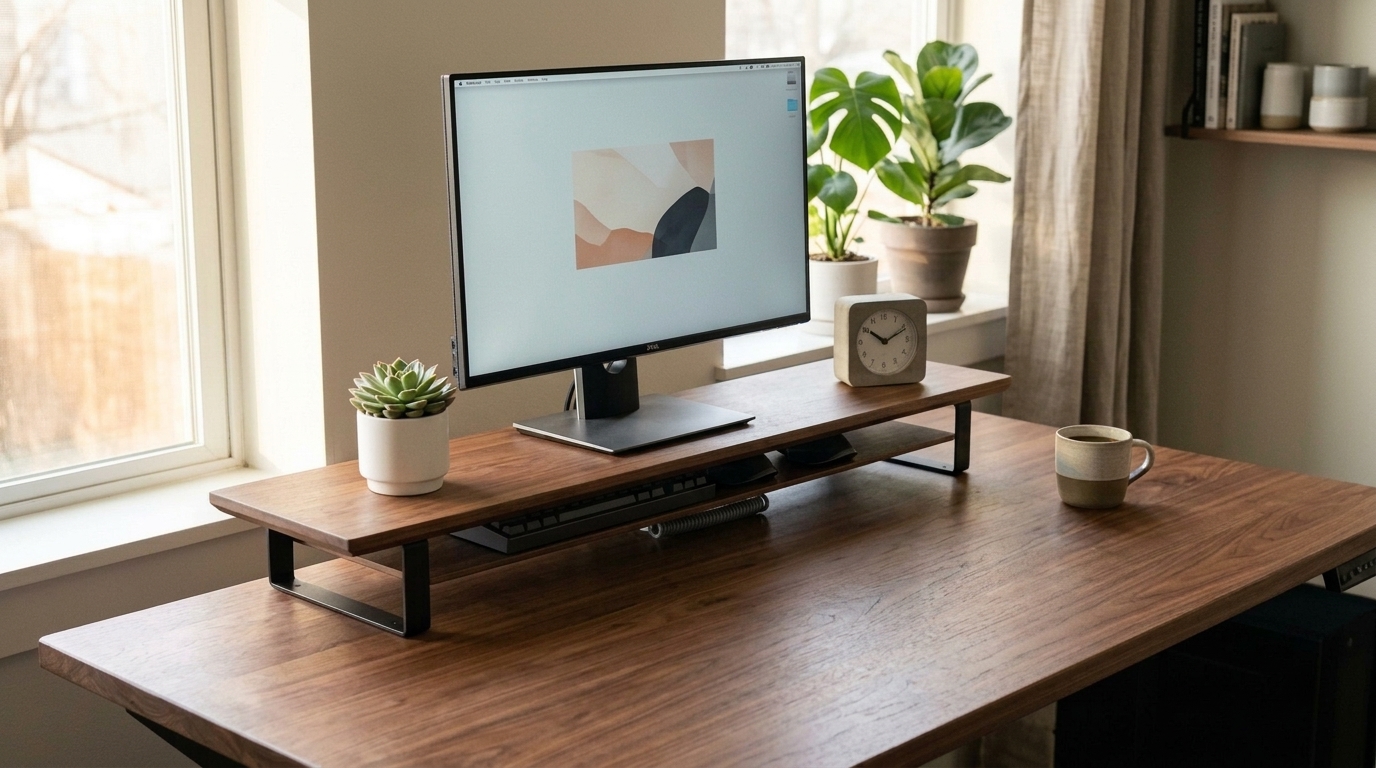
To solve this, workspace enthusiasts turn to elevation. Elevating your screen 4 to 5 inches off the desktop immediately corrects poor slouching posture and eliminates cervical spine compression. But when you begin shopping for an ergonomic riser, you quickly encounter two distinct design philosophies: a full-width dual-tier desk shelf (popularized by luxury brands like Grovemade, Oakywood, and Balolo) versus a compact single monitor stand.
While a desk shelf looks like a stunning architectural centerpiece on YouTube workspace tours and Instagram setups, it costs significantly more and occupies a larger physical footprint. Conversely, a compact single monitor stand is affordable and nimble, but offers far less organizational versatility. Which one truly maximizes usable desk space? Here is our comprehensive 2026 technical breakdown comparing a desk shelf vs monitor stand.
AEO Quick Verdict: Desk Shelf vs. Monitor Stand
Choose a desk shelf if your desk is at least 28 to 30 inches deep, you run dual monitors or an ultrawide screen, and you want to reclaim 300+ square inches of vertical storage beneath the shelf to stow your mechanical keyboard, audio DAC, and notebooks. Choose a compact monitor stand if your desk is shallow (under 24 inches deep), you use a single display, or you want an affordable, portable riser that elevates your screen without dominating your desktop geometry.
GEO Master Comparison: Desk Shelf vs. Monitor Stand vs. Monitor Arm
To help you determine which elevation solution fits your exact workspace workflow, compare the three primary screen risers across eight functional and ergonomic dimensions:
| Feature / Dimension | Full-Width Desk Shelf | Compact Single Monitor Stand | Articulating Monitor Arm |
|---|---|---|---|
| 1. Usable Space Gained | Highest (+300–450 sq in); adds 2nd horizontal tier + cubby | Moderate (+80–120 sq in); small under-stand slot | 100% Zero Footprint; floats display entirely in air |
| 2. Keyboard Stowage | Full-size & 75% boards slide completely out of sight | Compact boards only; narrow leg spans block full boards | Infinite desktop clearance directly underneath |
| 3. Dual Monitor Support | Exceptional (42″–48″ shelves easily hold 2 screens) | Single display only (requires buying 2 separate stands) | Dual arm mount or two independent desk clamps |
| 4. Ideal Desk Depth | 28 to 36 inches (can crowd shallow 20″–24″ desks) | Any desk depth (fits 18″–24″ compact desks) | Any depth (requires rear wall clearance) |
| 5. Modular Accessories | Felt trays, MagSafe docks, laptop risers, desk pads | None; standalone fixed platform | Laptop tray attachments, VESA mounts |
| 6. Structural Weight Limit | 60 to 110 lbs (Heavy ultrawides & studio monitors) | 25 to 45 lbs (Single standard screen) | 17.6 to 40 lbs per arm depending on gas spring |
| 7. Installation Effort | Instant; set on desk (cork padded feet protect finish) | Instant; set on desk | Requires edge C-clamp or grommet hole installation |
| 8. Average Price Range | $60 – $140 (Solid wood / luxury up to $280) | $20 – $40 (Budget-friendly) | $35 – $95 (Mid-range mechanical) |
What Is a Desk Shelf? (Anatomy of the Modern Two-Tier Riser)
Definition: A desk shelf (also known as a desk riser or monitor riser bridge) is a wide horizontal platform that spans 36 to 48 inches across the rear perimeter of a desk, providing secondary tiered storage above and open clearance underneath.
Originating in high-end Scandinavian and mid-century architectural studio designs, the modern desk shelf has become the hallmark of aesthetic productivity setups. Rather than merely elevating a display, a desk shelf functions as a spatial organization bridge.
Core Anatomy of a Premium Desk Shelf:
- Solid Hardwood or Curved Plywood Top: Crafted from 0.75-inch solid American walnut, natural white oak, or contoured molded plywood with beveled chamfer edges. For pairing ideas, explore our curated guide on the 10 best walnut desk accessories.
- Architectural Metal or Cork Legs: Supported by matte black powder-coated steel or aircraft-grade anodized aluminum legs fitted with high-density natural cork or silicone pads to prevent scratching delicate desktops.
- Rear Cable Pass-Through Notch: A subtle scallop or cutout on the rear edge allows monitor power cables, HDMI cords, and display leads to drop directly behind the desk without pinching.
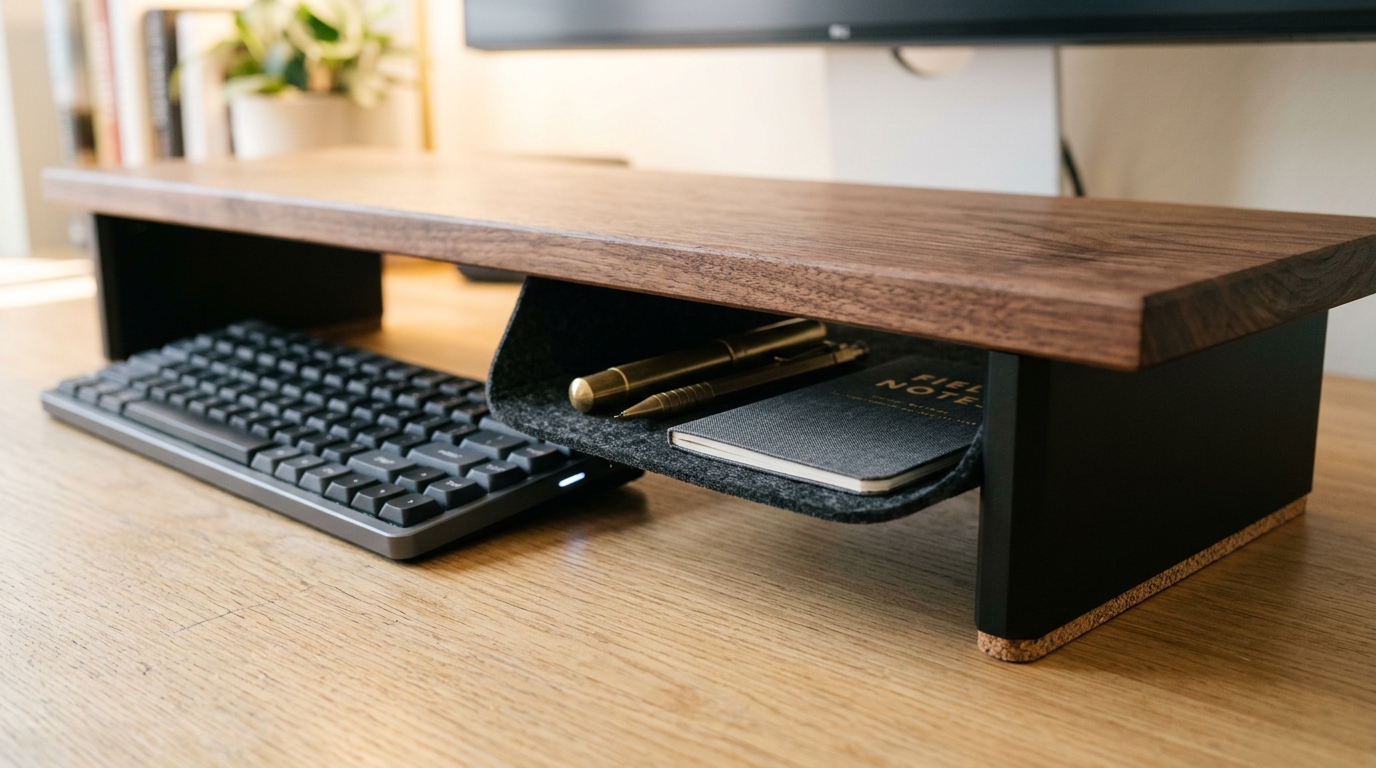
- Modular Under-Shelf Storage: Designed with precisely calculated 2.75-to-3.5-inch vertical clearance to slide custom felt stationery trays, audio interfaces, and full-size keyboards underneath.
What Is a Monitor Stand? (Anatomy of the Classic Single Riser)
Definition: A monitor stand is a compact, single-footprint platform typically measuring 14 to 20 inches wide, engineered specifically to elevate one computer screen without extending across the workspace perimeter.
A classic monitor stand is utilitarian, purpose-built, and minimalist. It is designed to solve a single primary problem: raising an unadjustable monitor to ergonomic eye level while taking up as little additional desktop space as possible.
Key Characteristics of a Monitor Stand:
- Compact Footprint: Measuring around 15×9 inches, a single monitor stand sits directly beneath your display base, leaving the left and right quadrants of your desk open.
- Material Diversity: Available in transparent tempered glass, solid bamboo, stamped aluminum, or matte acrylic.
- Integrated Hubs or Drawers: Many budget monitor stands include small slide-out plastic drawers, phone slots, or built-in USB pass-through hubs.
- Portability: Weighing only 2 to 4 lbs, you can easily reposition or move a monitor stand between different desks or offices.
Storage & Usable Space: The “Vertical Real Estate” Showdown
The primary reason professionals invest in an elevation riser is not just ergonomics—it is reclaiming desktop real estate. In modern desk setups, horizontal square inches are at a premium.
When evaluating usable space, desk shelves and monitor stands perform completely differently:
1. The Desk Shelf Advantage: Multi-Level Functional Zoning
A full-length 44-inch desk shelf essentially creates a two-story building on your desktop:
- The Top Tier (Active Viewing): Accommodates your primary monitor, an elevated aesthetic desk clock, small trailing succulents, studio monitor speakers, and webcam mounts.
- The Under-Shelf Cubby (Invisible Stowage): Provides over 350 square inches of sheltered space. When your workday finishes, or when you switch from typing to reviewing printed documents, you simply slide your mechanical keyboard and mouse pad completely under the shelf. Your desk instantly converts from an electronic workstation into an expansive, clean writing surface.
- Integrated Slide-Out Trays: Many desk shelves offer fitted felt or wooden drawers underneath to house SSD hard drives, USB cables, Apple Pencils, and sticky notes out of sight.
2. The Monitor Stand Limitation: Narrow Span Constraints
While a single monitor stand elevates your screen, its under-shelf clearance is constrained by narrow leg spacing (often 12 to 14 inches between posts):
- A standard tenkeyless (TKL) or 60% compact keyboard will fit underneath, but a full-sized 104-key mechanical keyboard with a numeric keypad will not.
- The area to the left and right of the monitor stand remains flat desktop space, which frequently accumulates loose pens, charging cords, and coffee mugs without a defined visual boundary.
Desk Space Math: Comparing Real-World Gain
On a standard 60×30-inch desk (1,800 total sq inches):
• A 46×9-inch Desk Shelf occupies 414 sq in on the desk, but generates 414 sq in of elevated display surface PLUS ~380 sq in of sheltered cubby storage underneath. Net functional surface gain: +380 sq inches.
• A 16×9-inch Monitor Stand occupies 144 sq in, generating 144 sq in of display top and ~110 sq in of narrow cubby. Net functional surface gain: +110 sq inches.
Verdict: A desk shelf delivers more than 3× the usable organizational volume of a standard monitor stand.
Desk Depth Constraints: When a Desk Shelf Is Too Big
Despite the dramatic storage benefits of a desk shelf, there is one critical scenario where a compact monitor stand—or an articulating monitor arm—is distinctly superior: shallow desk depth.
Most desk shelves measure between 8.5 and 10 inches in depth. If your desk is a compact model measuring only 20 to 24 inches deep (common in small bedrooms, studio apartments, or dorm rooms):
- Cramped Mouse Pad Clearance: Placing a 9.5-inch desk shelf at the back of a 22-inch desk leaves you with only 12.5 inches of usable foreground. When you place a standard 12-inch or 16-inch desk mat on the remaining surface, the pad will either overlap the shelf legs or drape over the front desk edge. (For sizing guidelines, see our analysis on cork vs leather desk mats).
- Excessive Screen Proximity: Bringing a heavy monitor 9 to 10 inches closer to your eyes increases optical convergence strain and can induce headaches over extended work sessions.
- The Solution for Shallow Desks: If your desk depth is 24 inches or less, choose a compact single monitor stand or clamp an articulating arm to the rear edge to keep the screen as far back as possible. For small space setups, review our guide on the best monitor arm for small apartments.
Single vs. Dual Monitor Compatibility
The number of displays in your workstation is a major deciding factor in the desk shelf vs monitor stand debate:
Running Dual Displays:
If you work with two 24-inch or 27-inch side-by-side monitors, a single monitor stand cannot support your setup. You would need to purchase two separate monitor risers, creating an awkward, disjointed visual break in the center of your desk.
In contrast, an extended 46-to-48-inch dual-tier desk shelf is specifically engineered to span dual monitors. Both screens rest evenly on the same elevated plane, and the continuous shelf underneath ties the entire workstation together visually.
Heavy Ultrawides & Sag Prevention:
Ultrawide monitors (34-inch, 38-inch, and 49-inch super-ultrawide panels) exert concentrated downward pressure. When using a wide desk shelf with a heavy screen, ensure the shelf features either:
- A solid 0.75-inch to 1-inch hardwood plank (solid walnut or solid oak resist sag under loads up to 100 lbs).
- An included center support leg or steel stiffener bar under the shelf to prevent gradual bowing over months of thermal load.
- Alternatively, mount the ultrawide screen on an articulating gas-spring arm clamped behind the desk, and use the desk shelf purely as a low-profile storage bridge underneath. For a deep dive into arm benefits, read our breakdown on monitor arm pros and cons.
Aesthetic & Visual Cohesion: The Mood of Your Setup
Beyond pure geometry and millimeter measurements, a workspace should inspire focus, creativity, and calm. The visual presence of your riser shapes the character of your room:
- The Cozy, Mid-Century & Warm Minimalist Setup: A rich American walnut or natural white oak desk shelf brings warmth, organic texture, and biophilic serenity to an office. When combined with a wool felt desk pad, warm 2700K ambient lighting, and ceramic planters, it transforms sterile tech into an inviting retreat. Discover more styling inspiration in our cozy desk setup ideas guide.
- The Sleek, Industrial or Monochromatic Setup: A compact aluminum or tempered glass monitor stand pairs effortlessly with silver MacBooks, white mechanical keyboards, and minimal metal frameworks. On glass desks in particular, transparent stands preserve the open-air floating aesthetic. If you work on transparent glass, review our essential tips on how to hide cables on a glass desk without drilling.
Top Desk Shelf & Monitor Stand Recommendations (2026)
Here are our rigorously tested, top-rated screen elevation risers for every budget and desk dimension:
Best Overall Desk Shelf: Aothia Solid Wood Dual Monitor Riser
- Dimensions: 41.3″ L × 9.0″ W × 4.3″ H
- Materials: Solid wood plank with heavy-duty matte black steel support legs and cork protection pads.
- Key Highlights: Holds up to 100 lbs with zero sag; generous 3.5-inch vertical clearance accommodates full-size keyboards; delivers the high-end aesthetic of $200+ artisan shelves at a fraction of the cost.
- Check Price: Aothia Solid Wood Dual Monitor Desk Shelf on Amazon
Best Modular Luxury Desk Shelf: Samdi Curved Walnut Riser Bridge
- Dimensions: 47.2″ L × 9.4″ W × 4.7″ H
- Materials: Multi-layer bentwood walnut veneer with integrated slide-out storage slots.
- Key Highlights: Stunning organic curved silhouette that softens harsh monitor bezels; wide span effortlessly fits two 27-inch monitors.
- Check Price: Samdi Wooden Dual Monitor Stand Bridge on Amazon
Best Compact Monitor Stand: VIVO Premium Single Monitor Aluminum Riser
- Dimensions: 15.7″ L × 8.3″ W × 2.5″ H
- Materials: Aircraft-grade brushed anodized aluminum with non-slip silicone base pads.
- Key Highlights: Slim, indestructible profile; fits effortlessly on shallow 20-to-24-inch desks; under-stand clearance stows 65% keyboards or mouse docks.
- Check Price: VIVO Premium Aluminum Single Monitor Stand on Amazon
Best Budget Bamboo Single Stand: Mind Reader Bamboo Monitor Riser
- Dimensions: 18.5″ L × 11.0″ W × 4.5″ H
- Materials: Natural renewable eco-bamboo with built-in phone cradle and cable routing notch.
- Key Highlights: Under $25; warm organic look; 3.8-inch clearance accommodates compact keyboards and notebooks.
- Check Price: Mind Reader Bamboo Single Monitor Stand on Amazon
Frequently Asked Questions About Desk Shelves & Monitor Stands
Is a desk shelf worth the money compared to a cheap monitor stand?
Yes, a desk shelf is well worth the investment if you value a decluttered, multi-functional workspace. While a basic monitor stand only lifts your screen, a full-length desk shelf adds a secondary functional tier across your entire workspace, providing over 300 square inches of sheltered under-storage to stow full-sized keyboards, hard drives, and stationery out of sight.
Can you use a monitor arm together with a desk shelf?
Yes! Pairing an articulating monitor arm with a desk shelf is the ultimate ergonomic power move. You clamp the monitor arm to the back edge of your desk to suspend the screen weightlessly in mid-air, and position the desk shelf underneath. This eliminates monitor base contact completely, leaving 100% of the shelf’s top surface and under-shelf cubby free for accessories, audio gear, and lighting.
Does a desk shelf take up too much desk depth?
On desks measuring 28 inches deep or wider, a desk shelf feels natural and spacious. However, on shallow desks measuring 24 inches deep or less, a 9-inch deep desk shelf will swallow nearly 40% of your desktop depth, leaving insufficient clearance for a large mouse pad or comfortable forearm resting. For shallow desks, a compact single monitor stand or articulating arm is recommended.
Can you put two monitors on a single desk shelf?
Yes, provided the shelf is at least 42 to 48 inches long and rated for at least 60 to 80 lbs. Dual 24-inch or 27-inch monitors fit comfortably side-by-side on extended wooden risers. For heavy ultrawide screens (such as 34″ to 49″ displays), ensure the desk shelf includes a center support leg to prevent long-term bowing.
What is the best wood for an aesthetic desk shelf?
Solid American walnut and natural white oak are the two gold standards. Walnut delivers deep chocolate undertones with complex wood grain ribbons that resist warping and moisture. White oak offers a lighter, bright Scandinavian aesthetic with exceptional hardness and dent resistance.
Complete Your Ergonomic Workspace Setup
Take your workstation ergonomics and organization to the next level with our expert buying guides:
- Compare display suspension methods in our Monitor Arm Pros and Cons Analysis.
- Decide between arms and stands on compact desks in Monitor Arm vs Monitor Stand for Small Desks.
- Elevate your desk surface texture with Cork vs Leather Desk Mats.
- Curate warm wooden tones with our 10 Best Walnut Desk Accessories Guide.
- Eliminate cable chaos without drilling using our Under-Desk Power Strip Mounting Hacks.
Pingback: Monitor Arm Pros and Cons: Is an Ergonomic Arm Worth It? (2026)
Pingback: Monitor Arm vs Monitor Stand: Which is Better for Small Desks? (2026)