
Disclosure: This independent ergonomic guide contains affiliate links. If you purchase through them, we may earn a modest commission at no extra cost to you. Read our full affiliate disclosure.
Whether you are assembling a flat-pack IKEA setup, commissioning a custom solid hardwood tabletop, or setting up a motorized standing desk, one fundamental dimension dictates your daily comfort more than any other: desk height. If your desk surface sits even two inches too high, your shoulders remain perpetually shrugged, pinching nerves in your neck and straining your upper trapezius muscles. If it sits two inches too low, you slouch forward, hunching your thoracic spine and cramping your knees against the underside of the frame.
Yet when you measure virtually any mass-market office desk sold today, you will find almost identical numbers stamped across specifications sheets: 28 to 30 inches (71 to 76 cm). Why did furniture makers standardize on this specific dimension, who does it actually fit, and what should you do if your body doesn’t match the factory template?
Quick Answer: What is the Standard Height of a Computer Desk?
The industry standard height of a fixed computer desk is 28 to 30 inches (71 to 76 cm) from the floor to the top of the working surface, with 29 inches (73.7 cm) being the universally adopted benchmark across manufacturers like IKEA, Herman Miller, and Steelcase. However, this standard was engineered in the mid-20th century to accommodate the average 5’10” (178 cm) adult male. In reality, a fixed 29-inch desk is too tall for over 85% of women and roughly 50% of men without ergonomic interventions such as under-desk footrests, keyboard trays, or height-adjustable desk legs.
The Historical Origin: Why 29 to 30 Inches Became the Global Default
To understand why standard desks feel uncomfortably high for so many modern knowledge workers, you have to look back at the history of commercial office furniture. Prior to personal computing, office work centered around two activities: manual handwriting and mechanical typewriters.
Pen-and-paper writing desks were traditionally built at 30 to 31 inches because leaning over paper required upright posture and broad forearm support. When mechanical typewriters arrived, their tall, raised keybeds required specialized “drop-leaf” secondary wells set at 26 inches off the floor to prevent severe wrist extension. But as desktop CRT monitors and slim computer keyboards replaced typewriters in the 1980s and 1990s, manufacturers consolidated everything into a single, cost-effective flat surface.
Furniture factories standardized around 29 inches because it was tall enough to allow the 95th percentile of adult males (roughly 6’1″ or 185 cm) to slide their thighs underneath without bashing their knees against the apron rail, while still providing enough vertical clearance for integrated pencil drawers and filing pedestals. In doing so, the industry prioritized manufacturing efficiency and leg clearance over proper upper-body typing biomechanics.
Comprehensive Ergonomic Desk Height Chart by User Height
Proper ergonomic alignment occurs when your forearms rest parallel to the floor with your elbows bent between 90 and 100 degrees while typing, with wrists flat in a neutral position. Consult this comprehensive chart to identify your exact ergonomic seated and standing desk heights:
| Your Height | Ideal Seated Desk Height | Ideal Standing Desk Height | Chair Seat Pan Height | Fit on Standard 29″ Desk |
|---|---|---|---|---|
| 5’0″ (152 cm) | 22″ – 23″ (56 – 58 cm) | 37″ – 38″ (94 – 97 cm) | 14″ – 15″ (36 – 38 cm) | Requires 6″ footrest + keyboard tray |
| 5’2″ (157 cm) | 23″ – 24″ (58 – 61 cm) | 38″ – 39″ (97 – 99 cm) | 15″ – 16″ (38 – 41 cm) | Requires 5″ footrest or drop tray |
| 5’4″ (163 cm) | 24″ – 25″ (61 – 64 cm) | 39″ – 40″ (99 – 102 cm) | 16″ – 17″ (41 – 43 cm) | 4″–5″ too high; footrest essential |
| 5’6″ (168 cm) | 25″ – 26″ (64 – 66 cm) | 41″ – 42″ (104 – 107 cm) | 17″ – 18″ (43 – 46 cm) | 3″–4″ too high; elevate chair + footrest |
| 5’8″ (173 cm) | 26″ – 27″ (66 – 69 cm) | 42″ – 43″ (107 – 109 cm) | 17.5″ – 18.5″ (44 – 47 cm) | Slightly high (2″ gap); low footrest helps |
| 5’10” (178 cm) | 28″ – 29″ (71 – 74 cm) | 44″ – 45″ (112 – 114 cm) | 18.5″ – 19.5″ (47 – 50 cm) | Perfect native fit for standard desk |
| 6’0″ (183 cm) | 29″ – 30″ (74 – 76 cm) | 45″ – 46″ (114 – 117 cm) | 19.5″ – 20.5″ (50 – 52 cm) | Comfortable native fit for standard desk |
| 6’2″ (188 cm) | 30″ – 31″ (76 – 79 cm) | 47″ – 48″ (119 – 122 cm) | 20.5″ – 21.5″ (52 – 55 cm) | Slightly low; needs 1″–2″ risers or casters |
| 6’4″+ (193 cm+) | 31″ – 33″ (79 – 84 cm) | 49″ – 51″ (124 – 130 cm) | 21.5″ – 23″ (55 – 58 cm) | Too low; requires 2″–3″ leg extensions |
The Biomechanics of an Ill-Fitting Desk Height
When your desktop height doesn’t match your seated anthropometry, your musculoskeletal system compensates in predictable, destructive ways:
- Shoulder Elevation & Trapezius Strain (Desk Too High): If your desk sits at 29 inches but your elbow height is 25 inches, you are forced to raise your shoulders upward into a permanent, sub-conscious shrug to get your hands onto the keyboard. After several hours, this causes chronic tension headaches, myofascial trigger points in the trapezius, and impingement of the rotator cuff tendons.
- Wrist Extension & Carpal Tunnel Compression: When typing on a surface that is higher than your forearms, your wrists must angle upward (dorsiflexion). This compresses the median nerve inside the carpal tunnel against the hard edge of the desk. To protect your tendons, pair your setup with a stable, cushioned surface—see our breakdown on how to stop a keyboard from sliding on a desk.
- Thigh Nerve Compression (The Dangling Feet Problem): People often try to solve a desk that is too high by cranking their office chair all the way up. While this aligns their elbows with the keyboard, it lifts their feet off the floor. The front waterfall edge of the chair pan now presses directly into the femoral nerve and popliteal blood vessels behind the knees, causing numb toes, restless legs, and poor lower-limb circulation.
- Thoracic Kyphosis & Forward Head Posture (Desk Too Low): For tall professionals over 6’1″, a 29-inch desk forces the user to hunch forward to reach the keyboard. Every inch your head leans forward adds approximately 10 pounds of gravitational pressure to your cervical spine, leading to early cervical disc degeneration. For tall setups, refer to our comprehensive guide on how to raise desk height for tall people.
How to Fix a Standard 29-Inch Desk If You Are Under 5’10”
Because most people cannot simply throw away their desk and buy an expensive custom-built unit, you need practical retrofits to bridge the height gap. If you are under 5’10”, you have three reliable options:
Strategy 1: The Elevated Chair + Ergonomic Footrest Combination
This is the most popular, cost-effective solution. Raise your office chair’s gas lift cylinder until your relaxed forearms are level with the 29-inch desktop. Then, bridge the resulting gap between your feet and the floor with an adjustable ergonomic memory foam footrest. A quality teardrop footrest supports the full length of your feet, tilts to encourage ankle mobility, and completely eliminates pressure on the backs of your thighs.
Strategy 2: Install an Under-Desk Keyboard Tray
If you prefer keeping your feet firmly planted on the floor, bring the typing surface down to your natural elbow level. Installing a sturdy clamp-on under-desk keyboard tray drops your keyboard and mouse 3 to 5 inches below the main desktop—placing your typing plane exactly at 24 to 26 inches. High-quality clamp trays require no drilling into hardwood desktops and slide smoothly out of sight when not in use.
Strategy 3: Trimming or Swapping Desk Legs
If your desk features modular cylindrical metal legs (like the IKEA OLOV or ADILS) or solid wood posts, you can physically shorten them. With IKEA OLOV legs, simply twist the telescoping collar to lower the desk down to 23.6 inches (60 cm). With solid wooden table legs, use a handsaw or miter saw to trim 2 to 3 inches from the bottom, sanding the cuts flat and attaching heavy-duty felt glider pads.
How to Raise a Standard Desk If You Are Over 6’0″
If your knees constantly knock into the front desk apron or you find yourself craning your neck downward, you need to elevate the desk frame by 1 to 4 inches:
- Heavy-Duty Furniture Risers: Solid steel or high-density polymer bed risers placed beneath each leg post distribute weight evenly across carpet or hardwood. If you place risers on plush flooring, be sure to inspect our diagnostic guide on how to stop desk wobble on carpet.
- Rollerblade Chair Casters: Upgrading your office chair’s factory nylon wheels to 3-inch polyurethane rollerblade casters instantly adds 1 to 1.5 inches of height to your chair, allowing you to use taller desk risers while keeping your knees bent at 90 degrees.
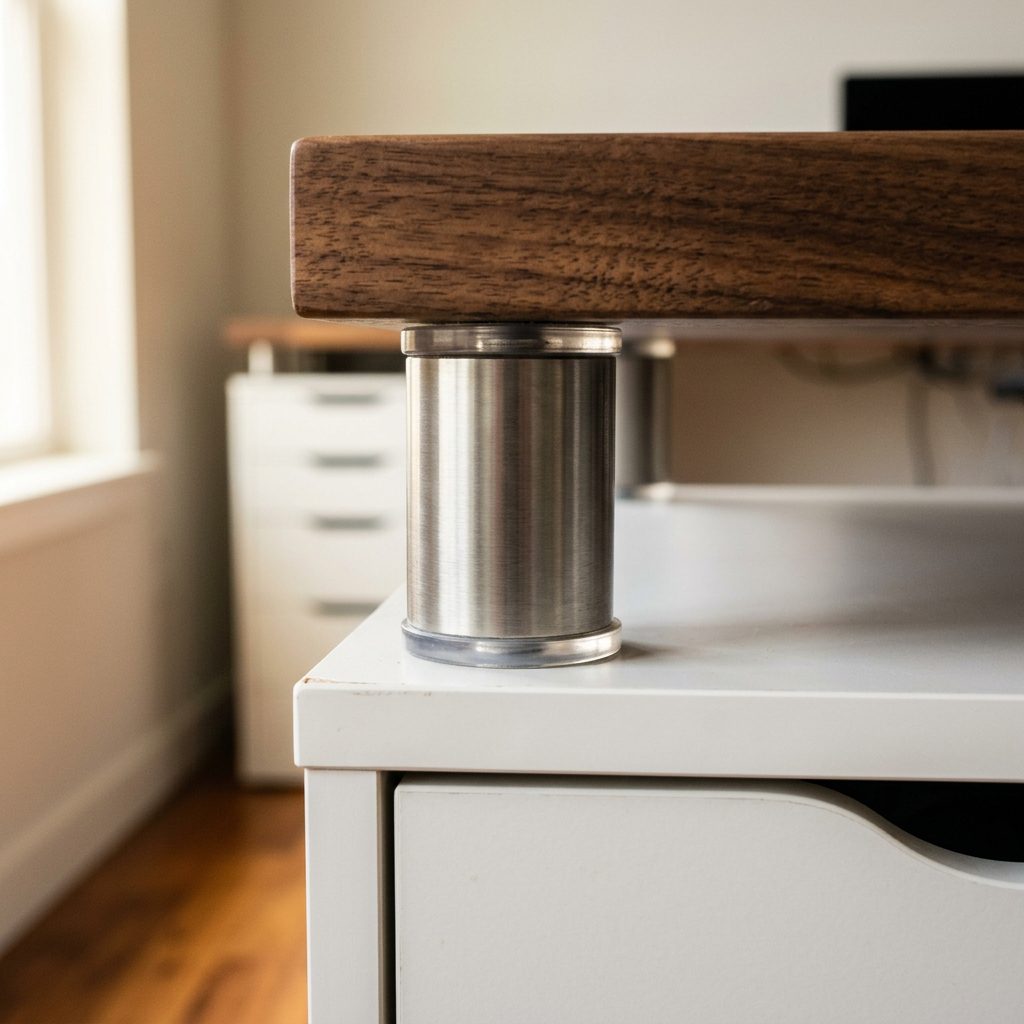
- Modular Tabletop Spacers: If you use an IKEA Karlby countertop resting on Alex drawer units, insert 2-inch stainless steel furniture risers with rubber vibration dampeners between the drawers and the wood slab. This elevates the surface from 28.5 inches to an ergonomic 30.5 inches while creating an aesthetic storage slot for audio interfaces, laptops, or keyboards.
The Secondary Equation: Monitor Eye Level vs. Desk Height
Getting your desk surface to the right height only solves half of the ergonomic equation. Once your hands and elbows are comfortably positioned at 90 degrees, your computer monitor must be positioned so that the top third of the screen aligns directly with your horizontal eye gaze.
Because standard computer stands included in monitor boxes rarely provide enough vertical travel, placing a display directly on a 29-inch desk forces almost everyone to tilt their head downward by 15 to 30 degrees. To position your display without cluttering your desktop, weigh your options in our comparative analysis of monitor arms vs. monitor stands, or browse creative DIY elevations in our guide on what to put under a monitor to raise it.
What to Look for in a Standing Desk Height Range
Motorized standing desks are celebrated as the ultimate ergonomic fix, but many budget standing desks suffer from the exact same limitation as fixed desks: poor minimum height travel.
Budget 2-stage standing desk frames typically have a bottom travel limit of 28 to 29 inches. If you are 5’4″, that standing desk cannot lower far enough to serve as an ergonomic seated desk! When investing in an adjustable standing desk frame, prioritize these features:
- 3-Stage Dual Motor Columns: Premium 3-stage lifting columns offer a wide adjustment span from 23 inches to 49 inches (58 to 124 cm), accommodating users from 5’0″ to 6’4″ in both seated and standing postures.
- Digital Memory Presets: Look for a hand controller with at least 4 programmable presets. Dial in your exact seated typing height (e.g., 25.5″) and standing height (e.g., 41.5″) to swap positions with one touch.
- Collision Detection Sensors: As the desk lowers to lower seated heights, gyroscope anti-collision systems prevent the frame from crushing under-desk filing cabinets or chair armrests.
Summary: Golden Rules of Desk Height
- Standard factory desk height is 28″ to 30″ (29″ being the most common default).
- This default height is engineered for someone 5’10″ tall; shorter users need adjustments.
- Never type with shrugged shoulders—adjust your chair height to your elbows first.
- If elevating your chair leaves feet dangling, add an under-desk footrest immediately.
- For standing desks, ensure the lower travel limit dips below 25″ if you are under 5’7″.
Pingback: What to Put Under a Monitor to Raise It: 7 Functional & Aesthetic Ideas (2026) - My Aesthetic Desk
Pingback: How to Stop a Desk From Wobbling on Carpet: 6 Proven Fixes (Thick & Thin Rugs) - My Aesthetic Desk