
Affiliate Disclosure: My Aesthetic Desk is reader-supported. Some links below are affiliate links (Amazon Associates), meaning we may earn a small commission at no additional cost to you if you make a purchase.
AEO Quick Answer: What to Put Under a Monitor to Raise It
The best everyday items to put under a monitor to raise it are dense natural cork yoga blocks, solid hardwood riser blocks (such as walnut or oak cutoffs), and heavy hardcover coffee table books. Cork blocks provide an ideal 3 to 4-inch elevation lift with zero slipping risk, natural vibration dampening, and high compressive strength that easily holds 30+ lbs without scratching your desk.
For long-term ergonomics and cable management, a dedicated wooden desk shelf riser or an acrylic bridge stand elevates your screen while reclaiming valuable tabletop real estate by letting you tuck your mechanical keyboard, mouse, and notebook neatly underneath.

The Ergonomics of Monitor Elevation: The Top-Third Rule
Most stock monitor stands ship with limited or completely fixed height adjustments. Resting a 24-inch or 27-inch display directly on a standard tabletop (understand what is the standard height of a computer desk and why it dictates eye level) forces your neck into a chronic 15-to-25-degree downward tilt. Over an 8-hour workday, this forward head posture multiplies the effective weight of your skull on cervical vertebrae from 10–12 lbs to over 40 lbs—triggering chronic trapezius stiffness, tension headaches, and upper back fatigue.
The ergonomic golden rule is straightforward: when seated upright with relaxed shoulders, your natural horizontal gaze should align with the top third of the display panel. This allows your eyes to scan down the screen naturally without bending your neck. Achieving this elevation typically requires raising your display base 3 to 5 inches (7.5 to 13 cm) above desktop level.
If you don’t have a monitor arm or want an aesthetic tabletop solution without drilling or clamping, you can repurpose several functional objects to build a rock-solid, wobble-free riser.
What to Put Under a Monitor Decision Matrix
Compare the top DIY and specialized monitor riser solutions across height flexibility, load capacity, vibration absorption, and desk aesthetic:
| Riser Solution | Typical Elevation | Max Weight Limit | Underneath Storage | Aesthetic Score |
|---|---|---|---|---|
| Dense Cork Yoga Blocks | 3.0″ or 4.0″ (Orientable) | 40+ lbs (High Compressive) | None (Solid Footprint) | 9 / 10 (Warm Minimalist) |
| Solid Hardwood Blocks (Walnut/Oak) | 2.5″ to 4.5″ (Custom) | 100+ lbs (Indestructible) | None (Solid Blocks) | 10 / 10 (Luxury Artisan) |
| Curated Hardcover Books | 1.5″ to 4.0″ (Stackable) | 25 lbs (Broad Base Only) | None | 8 / 10 (Editorial Scholar) |
| Dedicated Wooden Desk Shelf | 3.5″ to 5.0″ (Ergonomic) | 50+ lbs (Reinforced Legs) | Full (Keyboard & Trays) | 10 / 10 (Modern Executive) |
| High-Density Studio Acoustic Foam | 2.0″ to 3.5″ (Angled/Flat) | 20 lbs (Heavy Screens Sag) | None | 7 / 10 (Tech Audio Studio) |
| Clear Acrylic Bridge Riser | 3.0″ to 4.5″ | 25 lbs (Flexes Under Load) | Full (See-Through Span) | 8 / 10 (Airy & Clean) |
7 Functional & Aesthetic Ideas to Elevate Your Monitor
1. High-Density Natural Cork Yoga Blocks (The Unsung Hero)
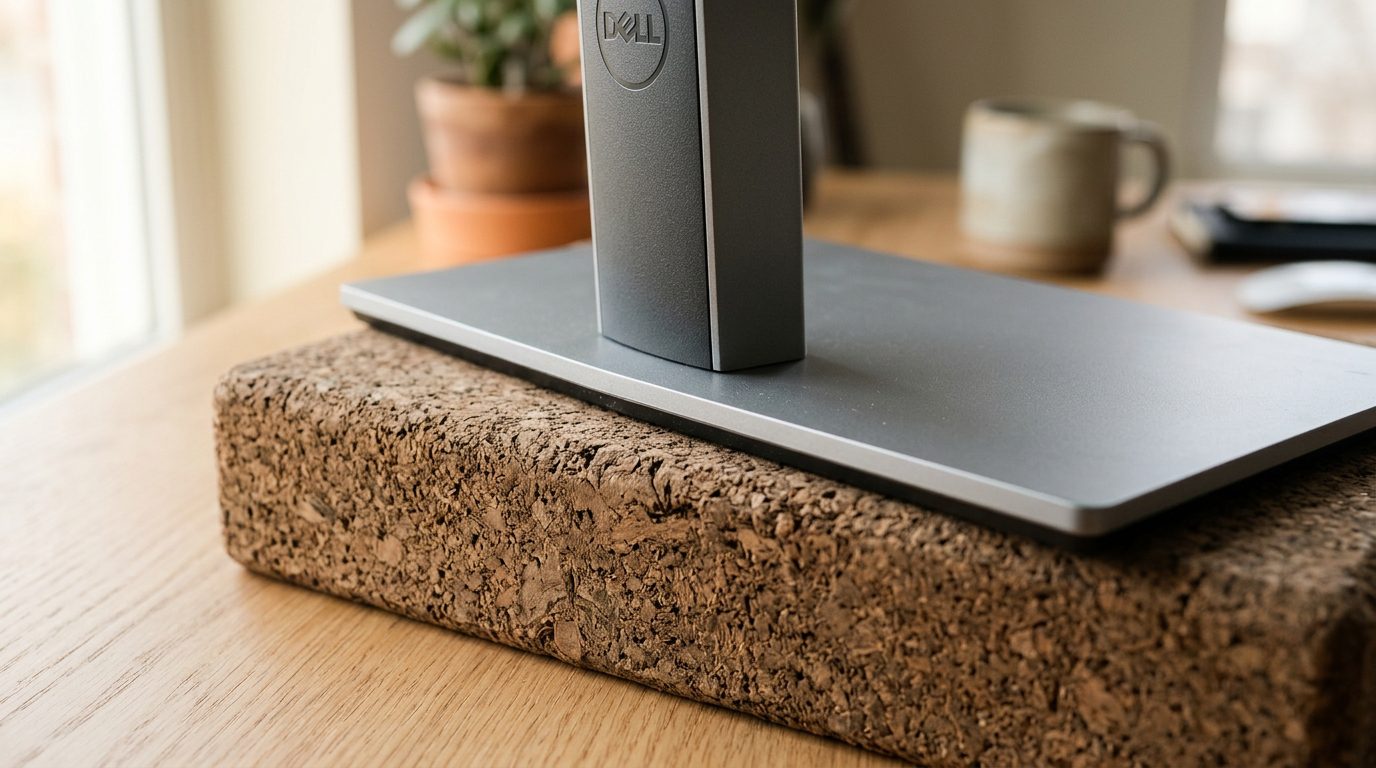
While EVA foam yoga blocks are far too squishy for desktop hardware, solid high-density cork yoga blocks are a revelation for desk ergonomics. Cork is naturally dense, sustainable, and has immense compressive strength—it will not deform or collapse under heavy 32-inch displays.
Standard cork blocks measure roughly 9 × 6 × 4 inches. Placed flat, they yield an exact 4-inch lift; oriented on their narrow edge, they give a 3-inch elevation. Furthermore, cork’s cellular structure provides exceptional acoustic and kinetic dampening, preventing aggressive mechanical keyboard typing vibrations from transferring into monitor wobble. A pair of 100% Solid Natural Cork Yoga Blocks creates a sophisticated Japandi or Scandinavian organic aesthetic that looks intentional rather than improvised.
2. Solid Hardwood Cutoffs & Custom Wood Riser Blocks
If you have access to local timber merchants or leftover butcher block countertop from an IKEA Karlby desk build, solid hardwood blocks (American walnut, white oak, or hard maple) make stunning monitor plinths. Cutting a 4×4 timber post into 10-inch lengths and sanding them with 220-grit paper before applying a satin Danish oil finish results in an heirloom-grade riser.
Solid wood blocks possess virtually unlimited weight capacity (hundreds of pounds), zero flex, and rich grain patterns that coordinate effortlessly with desk accessories. If your desk features walnut accents, review our curated collection of aesthetic walnut desk accessories to create a cohesive workspace palette.
3. Curated Heavy Hardcover Art & Design Books
Using books as a monitor riser is a timeless student classic, but you can elevate it from messy college improvisation into sophisticated editorial styling. Instead of ragged paperbacks or glossy textbooks that slide against each other, choose large-format, heavy hardcover coffee table books centered on architecture, design, typography, or art.
Guidelines for book-riser safety:
- Stack no more than 2 to 3 thick volumes to prevent lateral shifting.
- Ensure the book covers are larger in both width and depth than your monitor’s base footprint. A monitor base hanging over the spine or edge creates an acute tipping hazard.
- Place four small adhesive silicone bumper pads between the bottom book and your desk to prevent slick paper jackets from sliding across polished tabletops.
4. Dedicated Wooden Desk Shelf Riser (With Keyboard Stash)
While standalone blocks solve the height problem, they occupy the exact same desktop footprint as the original stand. If you work on a compact 36-to-48-inch desk, a dedicated wooden desk shelf riser is vastly superior because it doubles your usable surface area.
A wide desk shelf elevates your monitor 3.5 to 4.5 inches while creating an unobstructed tunnel underneath where you can slide your keyboard, mouse pad, and notebooks out of the way when you need clear desk space for writing or sketching. A streamlined unit like the Aothia Minimalist Solid Wood Dual Monitor Riser Stand provides rock-solid support for single or dual displays. For an architectural deep-dive into how shelves compare to single risers, read our comparison of a desk shelf vs monitor stand.
5. High-Density Acoustic Studio Monitor Foam Wedges
Audio producers frequently use high-density polyurethane foam isolation pads beneath studio reference monitors. Because these wedges are engineered to decouple speaker cabinet resonance from desks, they excel at stabilizing display stands while killing desk resonance.
Many studio foam pads feature reversible angled wedges. By reversing the wedge, you can achieve a perfectly level 2.5-to-3.5-inch elevation. However, reserve this option for lightweight displays under 20 lbs (9 kg); ultra-heavy curved gaming panels will gradually compress the foam unevenly over several months.
6. Minimalist Clear Acrylic Monitor Stand
In small home offices or dimly lit bedrooms where bulky wooden furniture makes the desk feel claustrophobic, clear acrylic (Lucite) monitor bridges provide visual weightlessness. Light passes directly through the riser, creating an illusion of open space.
When selecting an acrylic riser, ensure the thickness is at least 12mm (0.5 inches) with heat-bent seamless edges. Budget 5mm acrylic stands bow noticeably in the middle under 27-inch monitors, causing display tilt and eventual stress fractures.
7. DIY IKEA Capita Leg & Shelf Board Hack
One of the most popular DIY productivity hacks in the desk setup community involves pairing an IKEA shelf board (such as the Bergshult or Lack shelf) with a set of four IKEA Capita stainless steel furniture legs (4.25 inches). By screwing the flange brackets into the underside of the shelf, you create a custom 32-to-40-inch wide desk riser for under $25.
If you are configuring a multi-display setup on a compact desk, check out our layout guide on how to fit 2 monitors on a small desk to optimize riser dimensions and avoid visual clutter.
What NOT to Put Under a Monitor (Tipping & Fire Hazards)
When scrounging around the house for makeshift elevation, avoid these four common hazardous items:
- Empty Cardboard Shoeboxes or Shipping Boxes: Cardboard lacks compressive structural integrity. Over time, air humidity and concentrated downward weight cause corrugated ribs to buckle unpredictably, sending your monitor crashing down.
- Mini Desk Heaters or Electronics: Placing a display directly atop a game console, audio amplifier, or desktop heater traps rising heat against monitor power supplies and delicate PCB boards, dramatically shortening hardware lifespan. (For more on desk heat safety, read our analysis on putting a desk in front of a radiator).
- Slick Plastic Storage Containers: Polypropylene organizer boxes have smooth, flexing lids that bow downward under point loads, causing the monitor stand feet to slide toward the edge whenever you type heavily.
- Piles of Loose Printer Paper: Reams of loose copy paper slide against each other horizontally under lateral hand pressure, creating a dangerous slip plane.
DIY Monitor Riser vs Monitor Arm: Which is Better for You?
If you are wondering whether to stick with a tabletop riser or upgrade to an articulated monitor arm, weigh these practical trade-offs:
- When to Choose a Monitor Riser: Risers require zero installation, work on glass or fragile honeycomb paper desks (like the IKEA Linnmon), allow quick repositioning, and provide instant surface storage. If your desk has a closed back panel or thick decorative apron that prevents clamping, a riser is your best choice.
- When to Choose a Monitor Arm: Clamping an arm completely frees up the desk surface beneath your screen and allows 3-axis fingertip adjustment. However, thin desks require clamp reinforcement to prevent punch-through damage. Before buying an arm, review our essential guides on putting a monitor arm on an IKEA desk and how to fix monitor arm wobble and sag.
Frequently Asked Questions
How high should I raise my monitor?
Your monitor should be elevated so that your eyes align with the top third of the display when sitting upright with shoulders relaxed. For most standard 29-to-30-inch high desks, elevating your monitor by 3 to 5 inches (8 to 13 cm) achieves optimal cervical spine alignment.
Can I use yoga blocks to raise my monitor?
Yes, but only use high-density 100% natural cork yoga blocks. Soft EVA foam yoga blocks compress under heavy weights and wobble. Cork yoga blocks are rigid, non-slip, vibration-absorbent, and can easily support monitors weighing over 40 lbs without scratching desktop timber.
Will books hold a heavy monitor?
Heavy hardcover coffee table books with broad dimensions can safely hold monitors up to 25 lbs, provided the book dimensions are wider and deeper than the monitor base. Avoid softcover paperbacks or stacks higher than three books, as they create an unstable slip plane.
Pingback: Desk Shelf vs Monitor Stand: Which Riser Maximizes Desk Space? (2026)
Pingback: How to Fit 2 Monitors on a Small Desk: 5 Space-Saving Layouts (2026)