
Affiliate Disclosure: My Aesthetic Desk is reader-supported. Some links below are affiliate links (Amazon Associates), meaning we may earn a small commission at no additional cost to you if you make a purchase.
AEO Quick Answer: How to Fit 2 Monitors on a Small Desk (36″–48″)
To fit two monitors on a compact desk measuring between 36 and 48 inches wide, standard side-by-side flat placement on factory stands is physically unworkable. Two 24-inch screens measure 43 inches horizontally, while two 27-inch screens span 48 to 49 inches—leaving zero border margin and consuming over 45% of usable desktop depth.
The three most effective space-reclaiming layouts are: 1) Vertical Stacked Mounting (mounting the secondary screen directly above the primary on an extra-tall pole arm, slashing horizontal footprint to a single monitor width); 2) Landscape Primary + 90° Portrait Secondary (saving 9 to 11 inches of horizontal width); and 3) Inward-Angled 60° V-Wing on Articulated Gas-Spring Arms. Pairing these layouts with a vertical laptop stand and a compact 65% keyboard frees up to 70% of tabletop workspace.
The Dual-Monitor Math Problem on Compact Desks
When building an ergonomic home office or gaming station in a small apartment or bedroom nook, dual monitors provide an undeniable productivity boost. Having dedicated screen real estate for your IDE, spreadsheet, video timeline, or Slack chat eliminates constant Alt-Tab friction.
However, when you attempt to place two monitors on a desk narrower than 48 inches (such as standard 36-inch, 40-inch, or 42-inch compact desks), you run straight into cold, unyielding physical geometry:
- Standard 24-inch Monitor Dimensions: Typical width is ~21.5 inches. Side-by-side in a flat line, two 24-inch screens require 43 inches of desk width. On a 36-inch or 40-inch desk, your screens will overhang the edges, making them vulnerable to bumps and looking completely disproportionate.
- Standard 27-inch Monitor Dimensions: Typical width is ~24.2 inches. Side-by-side, two 27-inch screens require 48.4 inches of width. Even on a 48-inch desk, you have zero margin for speakers, desk lamps, or pencil holders.
- Factory Stand Footprint Penalty: Standard plastic manufacturer monitor bases occupy roughly 8 to 11 inches of desk depth each. On a desk with only 20 to 24 inches of total depth, two bulky stands consume between 40% and 55% of your total working surface, shoving your keyboard right against your stomach.
Fitting dual displays on a compact surface without compromising ergonomics requires smart mounting geometry, verticality, and peripheral scaling. Below is the comprehensive desk-width compatibility matrix to help you choose the right configuration before spending a single dollar.
Desk Width vs. Dual Monitor Compatibility Matrix
The following reference guide details how different monitor size combinations fit across compact desk widths (36″ to 55″), which layout functions best, and how much usable surface depth you reclaim.
| Desk Width Tier | Dual 24″ Horizontal Fit | Dual 27″ Horizontal Fit | Optimal Space-Saving Layout | Surface Depth Reclaimed | Required Hardware |
|---|---|---|---|---|---|
| 36-Inch Desk (Micro) | Fails (7″ overhang) | Fails (12.4″ overhang) | Vertical Stacked (Top/Bottom) | 60% – 70% depth recovered | Extra-tall 31″ vertical pole arm |
| 40-Inch Desk (Apartment) | Fails (3″ overhang) | Fails (8.4″ overhang) | Vertical Stacked OR Landscape + Portrait 90° (24″ only) | 55% – 65% depth recovered | Vertical pole arm or dual gas-spring arm |
| 44-Inch Desk (Small) | Fits Flush (1″ border) | Fails (4.4″ overhang) | Landscape + Portrait (24″/27″) or Angled V-Wing | 45% – 55% depth recovered | Dual articulated monitor arm clamp |
| 48-Inch Desk (Compact Standard) | Fits comfortably (5″ margin) | Tight Flush (0.4″ margin) | Angled 60° V-Wing or Landscape + Portrait | 40% – 50% depth recovered | Dual desk mount or twin single arms |
| 55-Inch Desk (Mid-Size Benchmark) | Spacious (12″ margin) | Fits comfortably (6.6″ margin) | Any side-by-side or stacked layout | 35% – 45% depth recovered | Dual articulated arm or desk shelf |
5 Space-Saving Dual Monitor Layouts for Small Desks
Layout 1: The Vertical Stacked Orientation (King of 36″–42″ Desks)
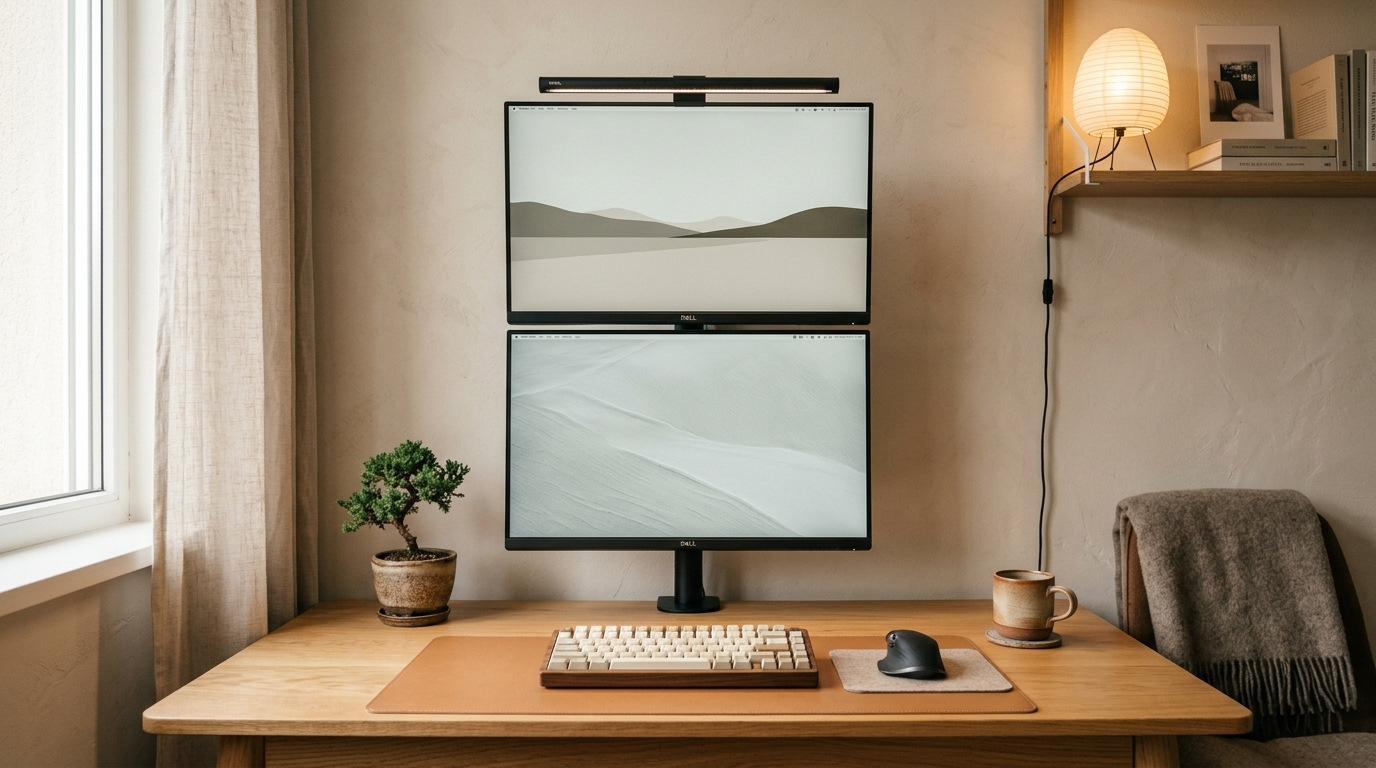
If your desk is 36 to 42 inches wide, the Vertical Stacked Layout (mounting one monitor directly above the other) is mathematically the single best setup you can build. Because both displays share the same horizontal boundary, the entire setup consumes only the width of a single monitor (approx. 21.5″ for 24″ monitors or 24.2″ for 27″ monitors).
How to execute it ergonomically:
- Primary Screen Placement: Place your main working screen on the bottom tier, positioned at standard ergonomic height so your eyes align naturally with the top third of the panel when sitting upright.
- Secondary Screen Placement: Mount your secondary screen directly above it on an extra-tall central steel pole, such as a vertical dual monitor pole arm. Tilt the upper screen downward between 15° and 25° toward your face to prevent cervical neck hyperextension.
- Best Use Case: Ideal for developers, video editors, music producers, and traders who keep primary timelines or code windows front-and-center while referencing logs, Discord, Spotify, or email on the upper display.
Layout 2: Landscape Primary + 90° Vertical Portrait Secondary
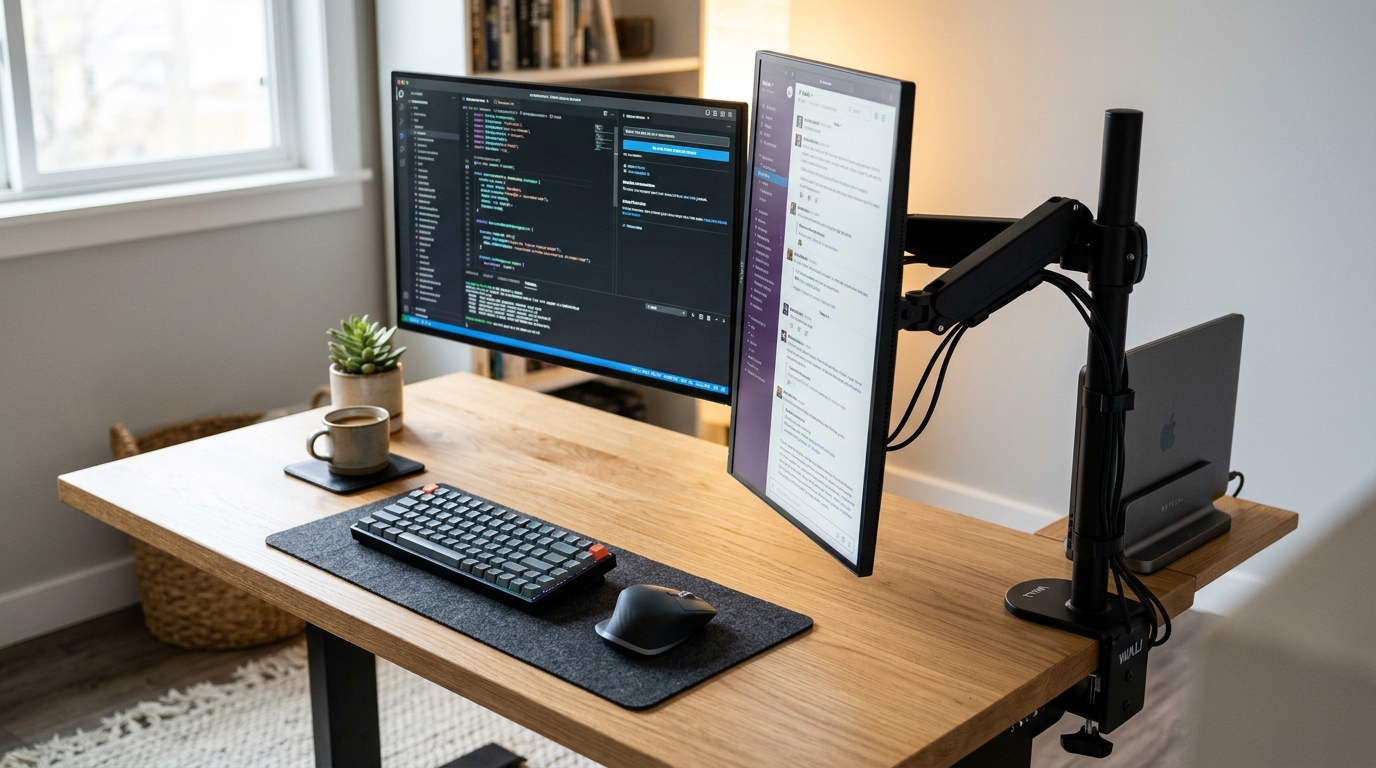
The Landscape + Portrait layout is the gold standard for writers, programmers, and students working on 40″ to 44″ desks. By rotating your secondary screen into a vertical 90-degree orientation, you dramatically compress horizontal desk consumption.
The Space Savings: Rotating a 24-inch monitor from landscape to portrait reduces its width from 21.5 inches down to roughly 12.5 inches—instantly freeing up 9 inches of horizontal tabletop space! A 27-inch landscape monitor (24.2″) combined with a 24-inch vertical monitor (12.5″) spans only 36.7 inches, allowing both screens to fit comfortably within a 40-inch or 44-inch desktop without an inch of overhang.
Ergonomic Advantage: Vertical displays are vastly superior for reading long PDF research papers, reviewing 200+ lines of code, scrolling documentation, or reading chat channels without horizontal eye travel.
Layout 3: The Inward-Angled 60° V-Wing (For 44″–48″ Desks)
If you insist on having two horizontal displays side-by-side but own a 44-inch or 48-inch desk, you cannot mount them completely flat. Instead, angle the screens inward toward your head at a 45° to 60° angle to create a gentle curved cockpit.
Angling two 24-inch monitors inward reduces total horizontal span from 43 inches down to approximately 38 inches. Crucially, this layout keeps both screens equidistant from your pupils, reducing focal fatigue. You will need a dual gas-spring articulated monitor mount to adjust each arm independent of the desk edge.
Layout 4: The Rear Corner Clamp Offset
One of the most common mistakes people make in tight quarters is clamping their monitor arm dead center along the back edge of the desk. As detailed in our guide on the best monitor arms for small apartments, standard dual gas-spring arms require 5 to 8 inches of backward elbow travel to bring monitors close together. If your desk sits flush against a drywall or bedroom partition, the arms hit the wall and force the screens 10 inches forward into your lap.
The Solution: Clamp your monitor base onto the rear side edge or far rear corner of the desk. By angling the main mounting pole from the corner, the articulation elbows sweep laterally across the back boundary instead of pushing backward against the wall, allowing your monitors to sit virtually flush with the rear edge.
Layout 5: Wall-Mounted Twin Articulated Arms
If you work on an ultra-compact 36-inch desk in a home office or bedroom where you are permitted to drill into wall studs, taking both displays completely off the desk surface via wall mounts is the ultimate aesthetic move. Independent low-profile wall mounts consume zero square inches of desk surface, eliminating clamp wobble, pole obstruction, and edge crush risks entirely.
Crucial Gear Swaps: How to Reclaim 70% of Desktop Space
Upgrading your screen layout is only half the battle. If you clutter your newly opened desk with full-sized office peripherals, your workstation will still feel cramped. Here are three high-impact hardware swaps that multiply your working room:
1. Adopt a Zero-Depth Vertical Laptop Stand
If you are powering your dual screens from a laptop (such as an Apple MacBook Pro or Dell XPS), never leave the laptop open on your desk unless you strictly need a third screen. An open 15-inch laptop consumes over 140 square inches of precious surface space. Instead, switch to clamshell mode and drop your laptop into an upright vertical laptop stand tucked neatly behind your secondary vertical monitor. For a step-by-step breakdown on optimizing docks and cables for multi-display laptop configurations, check out our dedicated guide to the dual monitor and laptop desk setup.
2. Downsize to a 65% or 75% Mechanical Keyboard
A full-sized 104-key office keyboard measures 17.5 to 18.5 inches wide because of the dedicated numeric tenkey pad. On a 36″ or 40″ desk, a full-size keyboard consumes nearly half of your front horizontal clearance, severely restricting your mouse swipe area. Downsizing to a 65% or 75% compact mechanical keyboard shrinks that footprint to 12.5 inches, reclaiming 5 to 6 inches of unhindered glide space for your mouse and wrist rest.
3. Reinforce Hollow IKEA Desktops Before Clamping Dual Arms
If you are building your dual monitor workstation on a budget desk like an IKEA Lagkapten or Linnmon, beware: these tops are constructed with a hollow paper honeycomb interior. Clamping a heavy dual monitor arm holding two 12-lb displays onto hollow cardboard will puncture or crush the top within weeks. Read our guide on can you put a monitor arm on an IKEA desk to install a steel reinforcement sandwich plate safely before mounting your displays. And if your displays ever start drooping or shaking when you type, follow our calibration checklist on how to fix monitor arm wobble and sag.
Frequently Asked Questions
Can two 27-inch monitors fit on a 40-inch desk?
Yes, but only in a vertical stacked configuration. Side-by-side in horizontal landscape, two 27-inch monitors require at least 48.4 inches of width, resulting in an unsightly 8.4-inch overhang on a 40-inch desk. Even in a landscape-plus-portrait configuration, two 27-inch screens require roughly 39.5 inches, leaving virtually zero margin. For a 40-inch desk, vertical stacking or stepping down to dual 24-inch displays is strongly advised.
Is a dual-arm mount better than two single monitor arms for a small desk?
For small desks placed against a wall, two independent single monitor arms are often better than a single dual-arm mount. Independent single mounts allow you to clamp each pole at opposite corners or offset positions along the rear edge, preventing the articulating elbows from hitting the rear drywall. However, if your desk is under 38 inches wide, an extra-tall single vertical pole mount holding both screens stacked is the most compact option.
How deep does my desk need to be for dual monitors?
The recommended minimum depth is 24 inches (60 cm). If your desk depth is 20 inches or less, placing dual monitors on factory stands will position the panels uncomfortably close to your eyes, leading to eye strain and headaches. If your desk depth is under 24 inches, you must use a monitor arm or wall mount to push the screens as close to the rear perimeter as possible.
Can I fit two monitors and a laptop on a small bedroom desk?
Yes, by running the laptop in closed-clamshell mode docked in an upright vertical stand, paired with a vertical stacked dual monitor arm. This allows you to power a complete dual-screen workstation within a compact 36″ to 40″ bedroom corner footprint. For inspiring small bedroom floorplans and nook layouts, explore our guide to creating an aesthetic bedroom desk setup.
Pingback: Dual Monitor & Laptop Desk Setup: 3-Screen Ergonomic Guide
Pingback: Can You Use a Monitor Light Bar on a Curved Monitor? (1000R Guide)