
Affiliate Disclosure: My Aesthetic Desk is reader-supported. Some links below are affiliate links (Amazon Associates), meaning we may earn a small commission at no additional cost to you if you make a purchase.
AEO Quick Answer: How to Prevent Cable Snag on a Standing Desk
To completely eliminate cable snags on an electric standing desk, adhere to the “Single Umbilical Principle”: mount your surge protector power strip, laptop docks, and power bricks directly beneath the moving tabletop. When all electronics travel upward together with the desk, only two lines ever need to move: one main AC power cord and one Ethernet cable.
Always calibrate your cable slack with the desk elevated to its maximum height preset, adding 3 to 5 inches (8–13 cm) of extra service slack. Route this descending bundle through an articulated magnetic cable vertebrae spine or flexible braided sleeve attached along one leg so cords never catch on crossbars or under-desk brackets during transit.
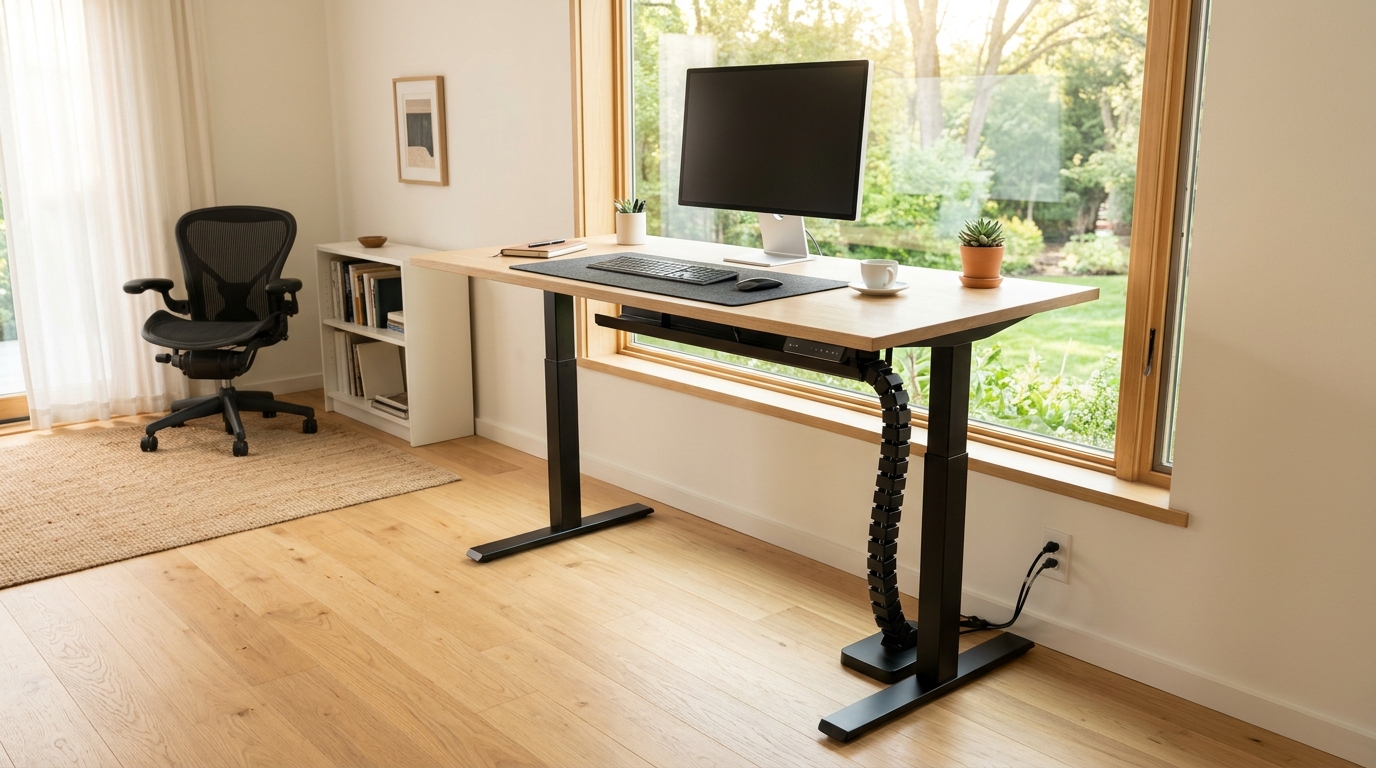
The Physics of Standing Desk Cable Snag: Why Wire Tension Destroys Hardware
Motorized standing desks are incredible for daily posture, circulation, and focus. However, introducing 20+ inches of dynamic vertical travel into an electronic workspace turns poorly routed cables into severe liability points.
When a motorized desk rises, two catastrophic scenarios occur if cord geometry is miscalculated:
- Acute Port Tension Yanking: If a DisplayPort, HDMI, or USB-C monitor cable runs from a stationary PC tower on the floor up to a rising monitor arm without enough slack, the dual-motor frame will exert over 150 lbs of pulling torque. It will instantly rip ports out of your graphics card, bend display pins, or snap motherboard headers.
- Crossbar Scissor Pinch Points: When the desk lowers back down to sitting height, excess loose cord slack loops outward. Loose loops frequently catch between the steel telescoping leg columns, crossbars, or under-desk drawer brackets, slicing through protective rubber insulation and causing short circuits.
By setting up a professional cable management system that controls both expansion and contraction, you can raise and lower your desk thousands of times without a single hitch or snag.
Standing Desk Cable Management Decision Matrix
Compare the most reliable wire-routing systems designed specifically for dynamic sit-stand desks:
| Cable Solution | Tension Control | Pinch Point Shielding | Installation Method | Aesthetic Rating |
|---|---|---|---|---|
| Articulated Cable Spine Vertebrae | Exceptional (Mechanical Track) | 100% Rigid Polymer Shell | Magnetic or Screw Bracket | 10 / 10 (Cyberpunk / Studio) |
| Expandable Braided Cable Sleeve | High (Flexible Elastic) | High (Abrasion Resistant) | Self-Wrapping Wrap | 9 / 10 (Clean Minimalist) |
| Under-Desk Clamp Cable Tray | N/A (Stationary Storage) | Protects Power Bricks | Clamp-On No Drill | 9 / 10 (Zero Desktop Clutter) |
| Adhesive J-Channel Raceways | Moderate (Rigid Segment) | High (Rigid PVC) | 3M VHB Adhesive Strip | 8 / 10 (Hidden Under Lip) |
| Zip-Tie Anchors with Velcro Loops | Low (Requires Manual Guide) | Moderate (Exposed Wires) | Peel & Stick Base Mounts | 7 / 10 (Budget Utility) |
The 5 Golden Rules of Zero-Snag Sit-Stand Routing
Rule 1: The “Max Height First” Calibration Principle
The number one mistake people make when setting up a standing desk is routing and zip-tying cables while the desk is resting at its lowest seated position (typically 27 to 29 inches). When you press your standing preset and the motors elevate the frame to 44 or 46 inches, all slack instantly vanishes—ripping plugs directly out of wall receptacles.
Always raise your motorized frame to its absolute maximum ceiling height before routing a single wire. Once extended to the limit, ensure your descending cable bundle still has a generous 3 to 5-inch service loop (gentle relaxed curve) before reaching the baseboard or floor outlet. If a wire is pulled taut like a guitar string at full height, replace it with a longer 10-foot or 15-foot cable immediately.
Rule 2: Anchor All Power Bricks Under the Moving Desktop
Never run individual cords from your monitor, laptop charger, speakers, and desktop light bar down to a power strip lying on the floor. Doing so creates 6 to 10 independent lines that each need to stretch and contract independently, virtually guaranteeing that one will catch on a chair arm or leg bracket.
Instead, implement the Single Umbilical Principle. Mount a heavy-duty surge protector directly to the underside of the desk frame using a clamp-on cable tray or industrial mounting brackets. (For clean mounting methods, check our full breakdown on how to hide a power strip under a desk). Every peripheral on your desk plugs directly into this under-desk strip. Consequently, only one single master power cord descends to the wall outlet.
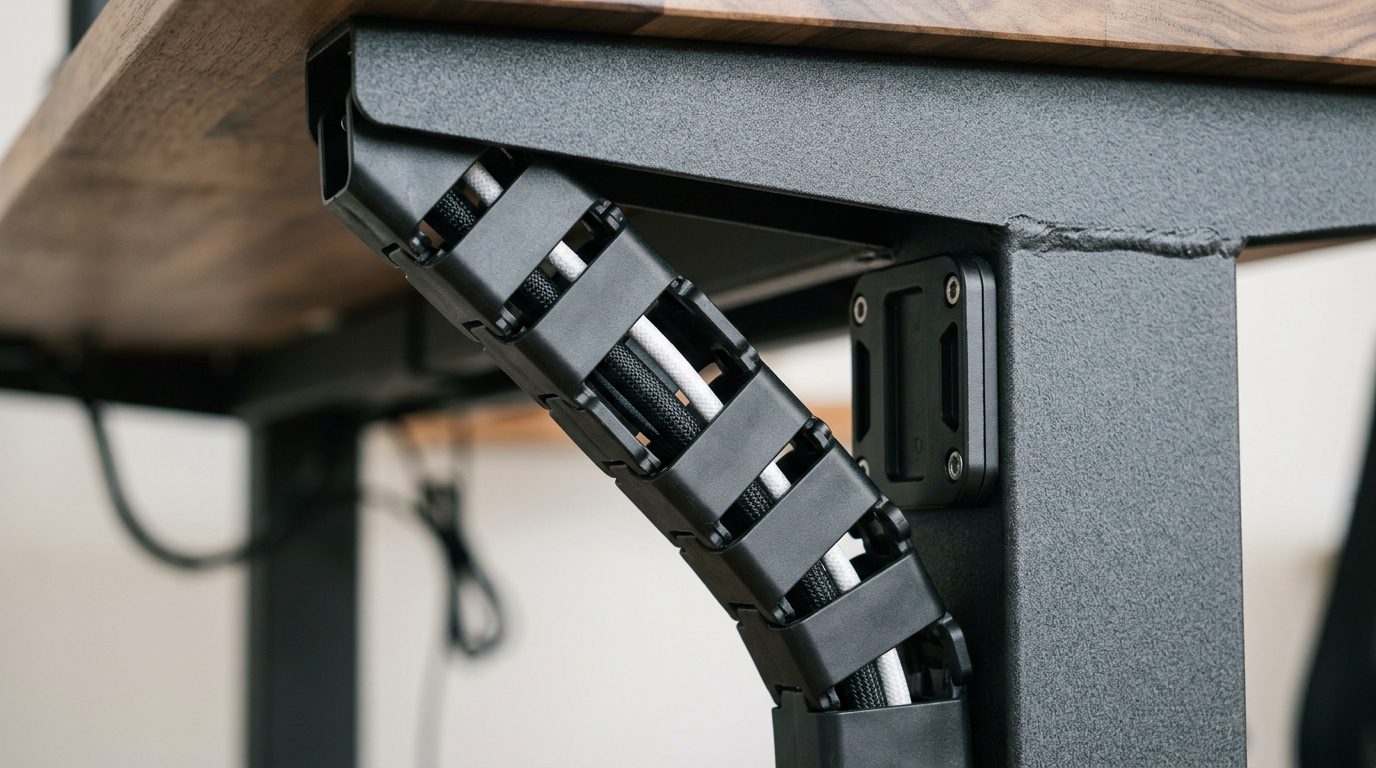
Rule 3: Route Umbilical Lines Through an Articulated Cable Spine
When a loose bundle of cables drops straight down, it tends to bend randomly in all directions. When the desk lowers, the excess slack loops outward into your legroom or folds inward toward the motor gears.
An articulated vertebrae cable spine is an engineered track made of interlocking polymer segments. It acts like a bicycle chain for your cords: it only bends in a single controlled forward-and-back plane. Equipping your desk with an ergonomic solution like the VIVO Articulated Magnetic Cable Management Spine anchors magnetically to your steel desk leg. As the desk rises, the spine extends effortlessly; as it lowers, the weighted floor base guides the vertebrae into a tidy, tight S-curve beneath the desktop.
For an in-depth review of dedicated spines, read our specialized guide on the standing desk cable management spine.
Rule 4: Wrap Flexible Runs in Braided Abrasion Sleeves
If you prefer a softer, fabric aesthetic over rigid polymer vertebrae, an expandable split-sleeve is your best ally. A high-density polyester braided sleeve such as Alex Tech 10ft Expandable Braided Cable Sleeving encases multiple cords into a single sleek tube.
The tight polyester weave protects wires from the repetitive friction of rubbing against drywall, steel desk legs, or baseboard trim during thousands of height adjustments. Anchor the top of the sleeve securely to the underside of the desk with a heavy-duty adhesive strain-relief clip so downward gravity cannot pull cords free from under-desk hubs.
Rule 5: Watch Monitor Arm Scissor Pinch Points
It is not just the desk legs that move—articulated gas-spring monitor arms flex continually when repositioned. Most monitor arms feature plastic cable channels built into the upper and lower aluminum segments.
When feeding DisplayPort and power cables into monitor arm channels, always leave a 4-to-6-inch slack loop at each articulation elbow joint. If you strap cables flush without elbow slack, tilting or pulling the monitor forward will sever the internal copper strands or bend the monitor’s rear input jack. If your monitor arm experiences sag or mechanical play, review our troubleshooting guide on how to fix monitor arm wobble and sag.
Common Dangerous Snag Traps to Avoid
- Low Window Sills & Window Blind Cords: If your standing desk is positioned against a window, rising desktops can snag loop cords on horizontal blinds, ripping the blinds out of the ceiling plaster. Always anchor blind cords high up on cleats.
- Under-Desk Drawer Stacking: If you use modular rolling drawer units (like the IKEA Alex), ensure the rising desk frame crossbar clears the top of the drawers with at least 1.5 inches of safety margin to avoid crushing dangling cords.
- Thick Plush Carpet Drag: On thick carpeted floors, descending cable slack can catch on rug edges or snag beneath desk feet. Ensure your desk is properly leveled on carpet using the mechanical tips in our guide to stopping desk wobble on carpet.
Frequently Asked Questions
How much cable slack is needed for a standing desk?
You need enough slack so that when your desk is raised to its highest standing preset (typically 46 to 50 inches), the umbilical cord run maintains a gentle, un-stretched 3 to 5-inch curve before reaching the wall outlet. Never allow cords to pull taut at maximum elevation.
Should I mount my PC on a standing desk or keep it on the floor?
Mounting your PC tower to the underside of the desk frame with an under-desk CPU mount is ideal for cable management because the distance between your PC and monitors never changes. If your PC must stay on the floor, invest in extra-long 10ft or 15ft display cables and route them through an articulated spine to prevent tension disconnects.
Can I use zip ties on standing desk cables?
Avoid plastic zip ties on moving, flexible sections because hard plastic edges can cut into wire insulation over time, and they cannot be adjusted easily. Instead, use reusable Velcro straps or articulated vertebrae cable spines that allow cables to slide smoothly as the desk extends.
Pingback: How to Mount a Power Strip Under a Desk Without Drilling (5 Hacks)